
The Vaccination Process
For Clinic Coordinators and Attendees (Staff)
What the Workplace Coordinator needs to do:
1. ENQUIRE ABOUT A QUOTE OR BOOKING
Contact VaxiCare to enquire about a Quote or Booking using our Online Booking Form.
Negotiate, we will contact you to discuss your needs, Time Slots and fees. Your appointments are tailored to your staff numbers, generally 12 Appointments per 15 minutes. There is no maximum, we will extend the Appointment if more time is required, the Nurse will stay to complete all vaccination bookings. If you require a Nurse to stay significantly longer than the appointment time, an additional hourly Nurse Fee may apply.
Booking Confirmation. Once confirmed, we email you a Booking Confirmation Link and QR Code with full instructions. You receive 2 emails, one is titled COORDINATOR Instructions, the other is titled STAFF booking instructions. You receive these booking links within 4 weeks of your appointment. Both emails contain 2 attachments, a QR Code and a User Guide.
2. HOW TO COMMENCE WITH STAFF BOOKINGS
Test your Booking Link and scan the QR Code from the original emails you received, due to security measures, the Booking Link will not work if copied and pasted second hand. Your IT Security may also block the Link from working, please contact your IT department for assistance and inform us there is an issue. Booking yourself in is a great way to test before informing your Staff, you can edit or cancel your booking online.
Promote the Event:
- Forward the email titled STAFF Booking Instructions with 2 attachments to your Staff
- Place our Poster and your QR Code in areas with high traffic at your workplace.Questions. If Staff have questions about Flu Vaccination, availability of certain types of Vaccines, the links below are provided in their email. They can also just email us their questions. These links are constantly updated.
Frequently Asked Questions and Vaccine Consumer Medical Information
3. ARRANGEMENTS
Venue Requirements (where possible)
- Central, preferably near hand washing facilities or bathrooms
- Clean (for vaccination purposes), climate controlled
- Print & display your QR Code at the Venue for Walk-ins without bookings, reduces delays.
- Suitably sized for your staff quota with table and chairs for 1 or 2 Nurses attending with eskys, room to unpack equipment.
- Room with seating for people who are delayed to come and queue, consider people may also queue outside or in the hallway.
- Ensure a waiting area is available where staff can remain for 15 minutes of post-vaccination observation.
- Ensure the Venue has a good strong Cellular and / or Wifi Backup Reception for our onlline booking system. This prevents major delays during the event, we are legally required to upload vaccination confirmation after each vaccination. If your signal reception is not reliable, please email us to prepare for offline vaccination with Paper Consent Forms, which you will have to distribute and collect after completion before the event, so we can capture ahead of time.Parking
Please arrange Free or reimbursable Parking for the Nurse, this helps us keep our fees affordableBuilding Access
Email us details of security admission, building layout or location maps, entrance gates and specific driving directionsMobile Phone Contact
Our Nurse will contact you on arrival 15 minutes prior to the appointment, essential for early morning appointments. If you are not going to be available on the day, email us alternative contact details.Compliance - Workplace Health and Safety Regulations, let us know if you need our current Workcover Certificate of Currency (CoC).
4. MONITORING YOUR BOOKING NUMBERS
Monitor bookings numbers online. You will receive login instructions with the Booking Link to do this. We send you regular booking number updates to ensure the minimum attendees requirement is met and suggest alternatives if your bookings are under the required limit. We don’t charge for appointment postponements or cancellations but we do ask you give us reasonable notice, at least 48 hours prior to event.
Encourage Staff to register online prior to the date, it helps us calculate the number of vaccines to bring and reduces delays.
Staff that register on arrival (ROA or walk-ins) will need:
- a Phone to book in
- Medicare or Individual Health Identifier (IHI) number is recommended, this ensures records are uploaded to the Australian Immunisation Register (AIR) asap for Proof of Vaccination.
We carry surplus vaccines for ROA’s but prefer pre-bookings that significantly reduces delays.Remind Staff regularly about the event. Attendees will receive SMS and email reminders just before the clinic. On the day, the Nurse will liaise with the Coordinator regarding absent staff that booked, referred to as no shows, this may affect your minimum attendee requirement, resulting in fees for unused vaccines. If staff with appointments are delayed, they can just show up and join the queue, appointments are not mandatory.
If our Nurse is delayed (eg traffic) on the day, please contact us, we will send an SMS to all Staff that booked regarding the delay.
What Attendees (Staff) need to know and do:
Make an Appointment
Using the Electronic Booking Link or QR Code from our original email, Staff must book themselves in to make an appointment. Staff are empowered to book, change or cancel appointments online, a detailed User Guide is supplied.Medical Consent, Health Checklist and Personal Medical Details
Each Staff Member must complete their own consent online and will be asked for their personal medical details.
Data is stored in accordance with the VaxiCare Medical Data Privacy & Security Policy.
Accuracy is important in order to receive Clinic updates and Proof of Vaccination.Booking on behalf of Children
Parents or Guardians must grant permission online when booking in on behalf of a child. Parents can use their own mobile and email to book in their children.
- Twins: In the case of same mobile number and DOB (eg Date of Birth for twins), please contact us to assist with your application, the booking system security check is based on unique DOB and consequent uploading of Medicare Records.
- Boarders: If a School Guardian can’t grant online permission on behalf of a boarder whose parents are overseas, please contact us to assist with contacting the overseas parents for consent. Please note, due to Security and Australian Medical Data Regulation, out booking system is not available overseas!Questions
FAQ and Vaccine Info for 2026 is available to assist Staff with Questions every step of the way.Type of Vaccine
Factor’s such as age determines the type of vaccine. The availability of the FLUAD QUAD Vaccine for 65 years and older depends on the supply date and number of vaccines given to Vaxicare by QLD Health Department. Vaxicare will advise you at least 1 day prior to your Clinic if the vaccine is not available, as an alternative you can choose to go to a GP or Pharmacy. Please keep consulting our Vaccine Information for the latest Vaccine Consumer Medical Info (CMI).We update this as soon as we receive news regarding vaccine availability and delivery from QLD Health.
Report at the Venue on the day at the time of their appointment. Appointments can be changed or cancelled online. Staff that are delayed can just show up and join the queue, appointments are not mandatory.
Register on arrival (ROA or walk-ins without appointments) will need:
- a phone to book in
- Medicare or Individual Health Identifier (IHI) number is recommended, this ensures records are uploaded to AIR asap for Proof of Vaccination.
We carry surplus vaccines for ROA’s but prefer pre-bookings that significantly reduces delays.
What to expect on day of vaccination
Our Nurse will contact the Coordinator on arrival 15 minutes prior to the Appointment, please ensure a direct number is available for the nurse, especially for early morning appointments. If the Coordinator is absent, please ensure there is stand-in person to contact.
For Attendees that registered prior to clinic date, our Nurse will:
Identify Attendees from their Appointment details
Assess Attendee suitability for vaccination by checking the Health Checklist they provided
Discuss any concerns with Attendees and make them feel at ease
Vaccinate the Attendee, it’s quick, the injection site will be hygienically sealed with a band-aid
Assist Attendees in case of any adverse reaction during their 15 minute observation period after vaccination
A pleasant experience, we provide free, dietary conscious, lollipops to all our participants!
For Attendees that register on arrival:
There will be a QR Code on the Wall to scan or the Nurse will provide a Booking Link or QR Code with instructions for the Attendee to book an appointment online
The Nurse will then follow the same process for Attendees that booked prior to clinic date.
Proof of Vaccination
With or without Medicare. Medicare is not needed to receive a Flu Vaccination. Each Attendee will receive a Vaccination Confirmation email after vaccination, a record of the completed vaccination will automatically be uploaded to Medicare. VaxiCare can issue a Vaccination Certificate for participants without Medicare on request.
How to find Proof of Vaccination from your myGov Health Record.
What is a Medicare Card IRN?
A Medicare IRN (Individual Reference Number) is the single digit to the left of your name on an Australian Medicare card, used to identify you as one of several people on the same card, ensuring the correct person is billed for services.
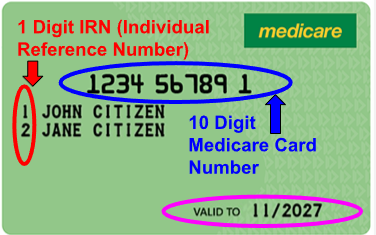
Medicare Card